
Google Flow now runs on Omni 1.2 Flash(Google calls it Gemini Omni 1.2 Flash), and most reviews only show the best clips. I wanted the real picture, so I gave Google Flow Omni 1.2 twelve tests with one rule: one start image, one prompt, and I keep the first result. No retries and no cherry-picking. It scored 9 out of 10 on eight tests, struggled on two, blocked one prompt, and would not upload one photo at all.
Quick answer: Omni 1.2 Flash in Google Flow is very good at faces, animals, dialogue with lip sync, camera moves, hands, readable text and liquids. It is weak when objects hit and break, it can change the location in the middle of a shot, it blocked a boxing scene, and it would not upload a photo of a child. My total: 83 out of 120 on first tries.
Tested on November 12, 2026, in my own Google Flow account. Every prompt is below, so you can run the same tests and compare.
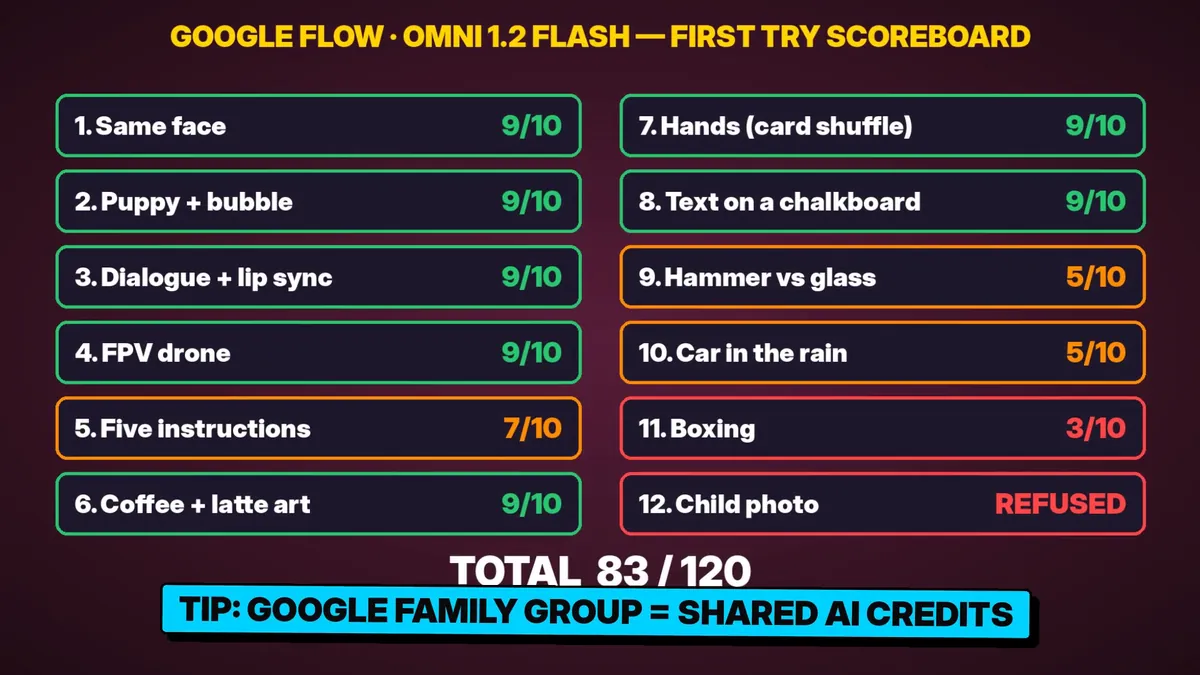
Google Flow Omni 1.2 Scoreboard: All 12 Results
| # | Test | Level | Score (first try) | Main finding |
|---|---|---|---|---|
| 1 | Same face | Medium | 9/10 | Face identical from wide shot to close-up |
| 2 | Puppy and soap bubble | Medium | 9/10 | Jump, pop, sneeze and head tilt, all in order |
| 3 | Dialogue and lip sync | Hard | 9/10 | Right words, right speaker, lips match |
| 4 | FPV drone dive | Hard | 9/10 | One smooth shot, nothing morphs |
| 5 | Five exact instructions | Hard | 7/10 | All five done, but an object was duplicated |
| 6 | Coffee and latte art | Easy | 9/10 | Real swirls, and a clean heart |
| 7 | Hands (card shuffle) | Hard | 9/10 | Five fingers on each hand the whole time |
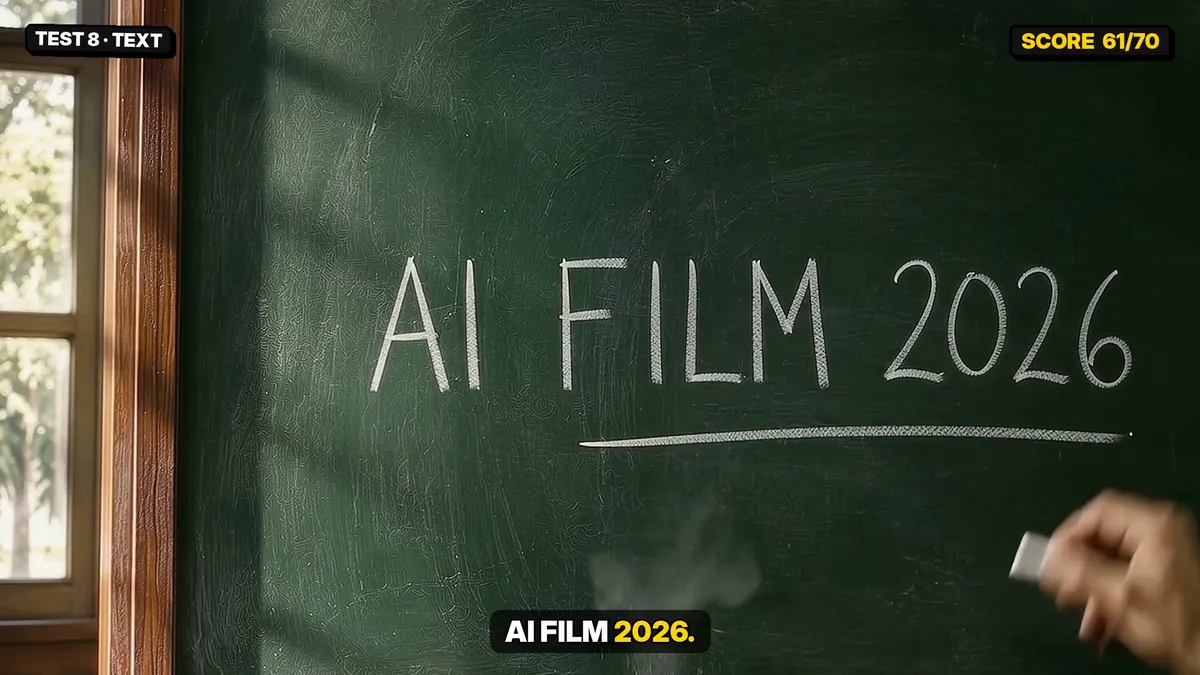
| 8 | Text on a chalkboard | Hard | 9/10 | Three words spelled correctly |
| 9 | Hammer vs wine glass | Hard | 5/10 | Glass bends like jelly before it breaks |
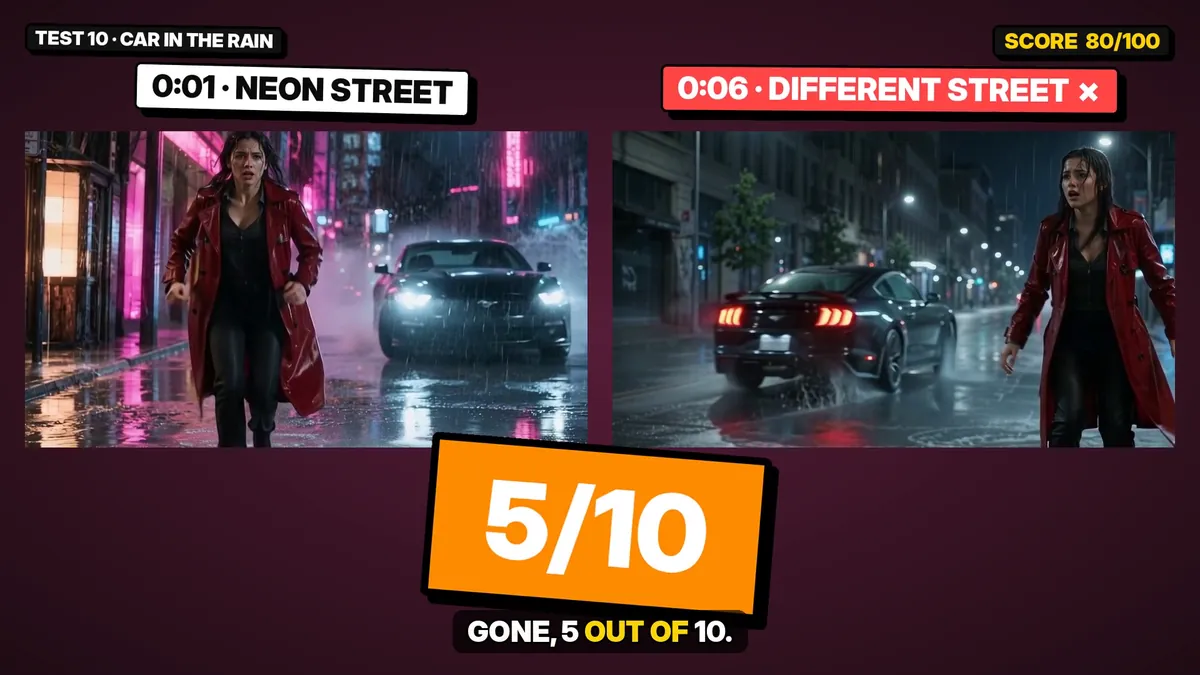
| 10 | Car drift in the rain | Hard | 5/10 | The whole street changes mid-shot |
| 11 | Boxing | Hard | 3/10 | Prompt blocked; only a softer version ran |
| 12 | Child’s birthday photo | Easy | Refused | The photo would not upload |
How I Tested Omni 1.2 Flash
- Same method every time: I made one start image in ChatGPT, uploaded it to Google Flow, and pasted one prompt.
- First try only: whatever Flow gave me first is what I rated. I only re-ran a test when Flow returned no video at all.
- Settings: 16:9, 8 seconds, sound on. Flow told me the default video model was Omni 1.2 Flash.
- Scoring: each prompt lists five things that must happen. I counted how many happened, then looked for glitches.
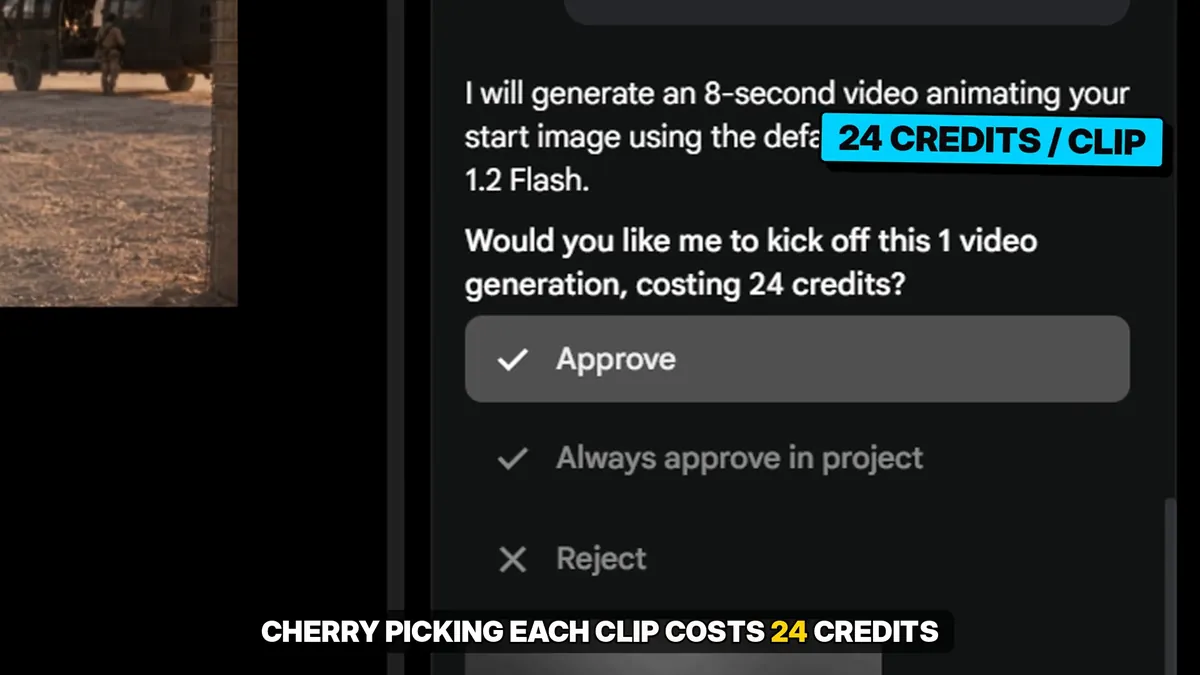
- Cost: Flow asked for approval before each clip and showed the price: 24 credits for an 8-second clip in my account.
New to Flow? Start with my step-by-step guide: how to make consistent AI characters for free.
What Google Flow Omni 1.2 Does Well
These eight tests all passed on the first try. If your project is mostly made of shots like these, Flow is ready for it.
Test 1: Same Face (9/10)
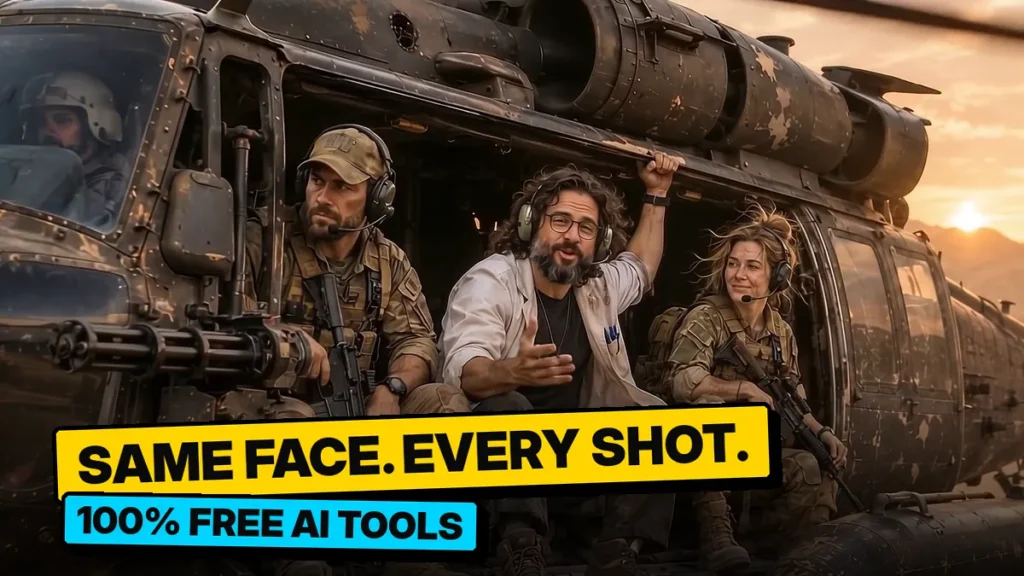
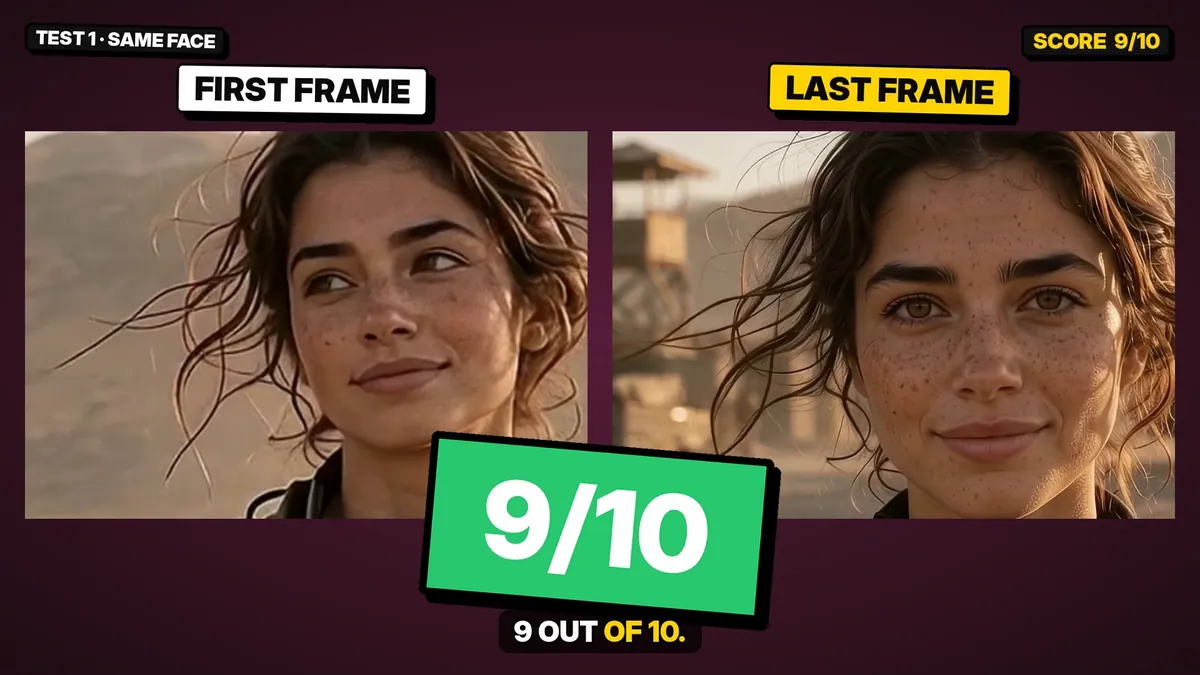
What I asked for: A soldier walks toward the camera, turns her head, and the camera pushes in to a close-up.
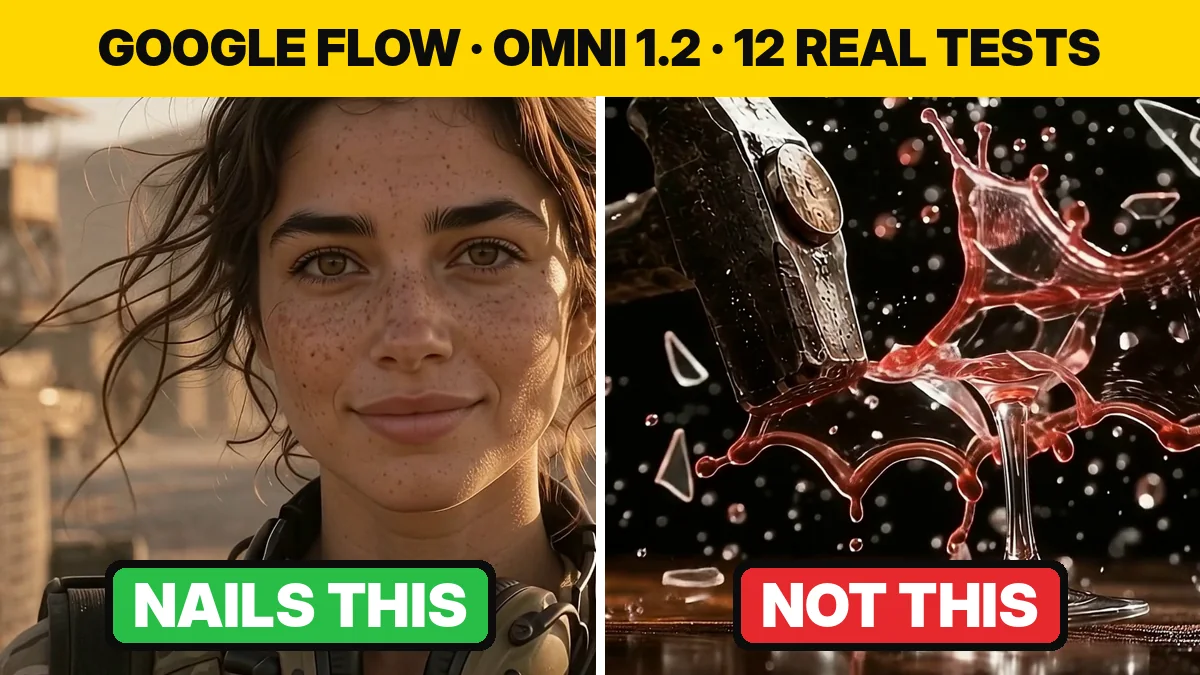
What Flow did: The face in the last frame matches the first frame: same freckles, same eyes, same hair. This is the hardest thing in AI filmmaking, and it worked on the first try.
Tip: start from an image of your character, not from text. A character sheet as the reference makes the face much more stable.
Image prompt (ChatGPT)
Attach your own character sheet as the reference image.
Use @image1 as the exact face, hair and uniform reference (same woman, same face).
Photo-realistic cinematic film still, 16:9. A US Army special forces woman soldier (exactly the woman in @image1: same face, freckles, hazel-green eyes, messy dark-blonde bun, multicam uniform, plate carrier, tan headphones around her neck) walks toward the camera across a desert forward operating base at golden hour.
Medium-wide shot, she is 8 metres from the camera, mid-step, looking slightly to her right. Behind her: sandbag walls, a watchtower, a parked Black Hawk helicopter, dust in the warm backlight.
35mm lens, natural skin texture, real film grain. No text, no logos, no watermark.
Video prompt (Google Flow)
Continue exactly from the start image. The woman keeps walking toward the camera at a steady pace.
0-3s: she walks forward, rifle slung, dust blowing past her boots.
3-5s: she turns her head and looks straight into the lens.
5-8s: the camera slowly pushes in until her face fills the frame in a close-up; she gives a small confident half-smile.
Her face, freckles, eye colour, hair and uniform stay exactly the same as in the start image for the whole clip.
SOUND: desert wind, boots on gravel, a distant helicopter idling. No music, no dialogue.
No text, no subtitles.
Test 2: Puppy and Soap Bubble (9/10)
What I asked for: A puppy jumps at a bubble, the bubble pops on its nose, the puppy sneezes and tilts its head.
What Flow did: All four actions happened, in the right order. The fur and the rainbow reflections on the bubbles look natural.
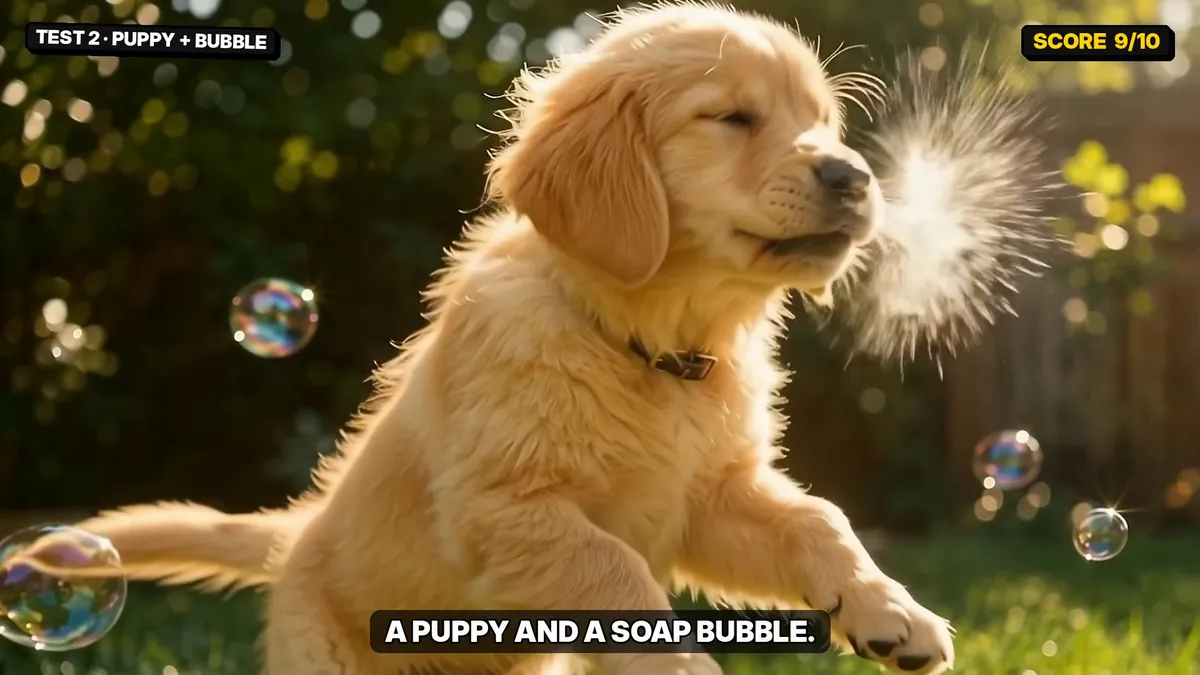
Image prompt (ChatGPT)
Photo-realistic film still, 16:9. A fluffy golden retriever puppy sits on bright green grass in a sunny backyard, looking up with wide curious eyes at a large shiny soap bubble floating just above its nose. Several smaller bubbles drift in the air, each reflecting rainbow colours.
Low camera at the puppy's eye level, 85mm lens, soft afternoon sunlight from behind making the fur glow, creamy background blur, real film grain. No text, no logos, no watermark.
Video prompt (Google Flow)
Continue exactly from the start image. Slow motion for the jump, normal speed after.
0-3s: the puppy wiggles, then jumps up with all four paws off the grass and snaps at the big bubble.
3-4s: the bubble pops right on the tip of its nose in a tiny spray of droplets.
4-6s: the puppy lands, scrunches its face and gives a big sneeze.
6-8s: it sits back down and tilts its head to the side, confused, while small bubbles keep floating past.
Camera: low, at the puppy's eye level, slight follow of the jump.
SOUND: soft paws on grass, a tiny bubble pop, a cute puppy sneeze, a small whine, birds in the background. No music.
No text, no subtitles.
Test 3: Dialogue and Lip Sync (9/10)
What I asked for: Two people in a tent. She says one line, he answers with another.
What Flow did: The right person spoke each line, the words were correct, and the lips matched. The voices sounded natural, not robotic.
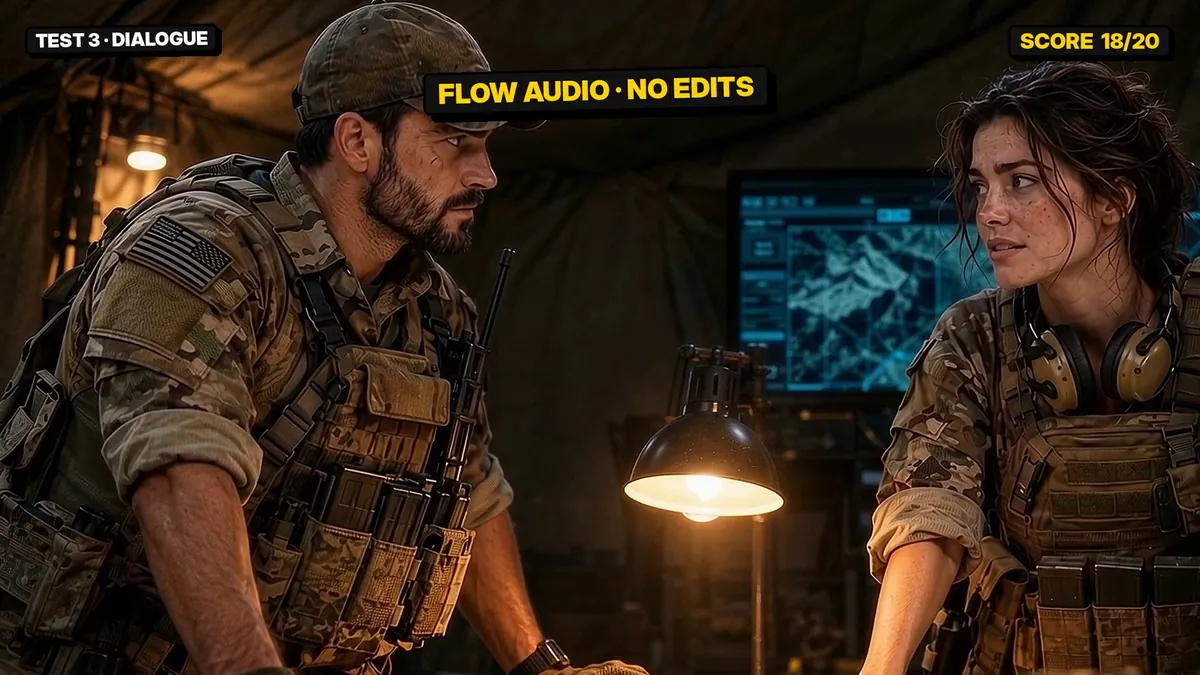
Tip: describe a voice for each character in the prompt (age, tone, pitch) and reuse the same description in every clip. That keeps the voice the same.
Image prompt (ChatGPT)
Attach your two character sheets as reference images.
Use @image1 as the exact face of the man and @image2 as the exact face of the woman.
Photo-realistic cinematic film still, 16:9. Inside a dim military briefing tent at night. The man from @image1 (US special forces soldier, beard, camo cap) stands on the LEFT, the woman from @image2 (freckles, messy dark-blonde bun, headphones around her neck) stands on the RIGHT. They face each other across a table with a glowing tactical map tablet, both half-turned toward the camera.
Warm lamp light from the table, a cold blue monitor glow behind them. Medium two-shot, 35mm lens, real skin texture, film grain. No text, no logos, no watermark.
Video prompt (Google Flow)
Continue exactly from the start image. Two-person dialogue, natural acting, steady camera.
0-4s: the woman on the RIGHT looks at the man and says, slightly annoyed:
AVA: "You said this place was abandoned."
4-8s: the man on the LEFT glances at the map, then back at her with a dry half-smile and says:
RYAN: "It was. Until about ten seconds ago."
Only one person speaks at a time; lips match the words exactly.
AVA'S VOICE: confident American woman, early thirties, clear mid pitch.
RYAN'S VOICE: calm, deep American man, late thirties, low gravelly baritone.
SOUND: generator hum, wind against the tent canvas, distant radio chatter. No music.
No subtitles, no captions, no text.
Test 4: FPV Drone Dive (9/10)
What I asked for: A drone dives off a cliff, passes a waterfall, skims a river and flies under a stone bridge.
What Flow did: One continuous move with no cuts. The canyon, waterfall and bridge stayed solid; nothing melted or changed shape.
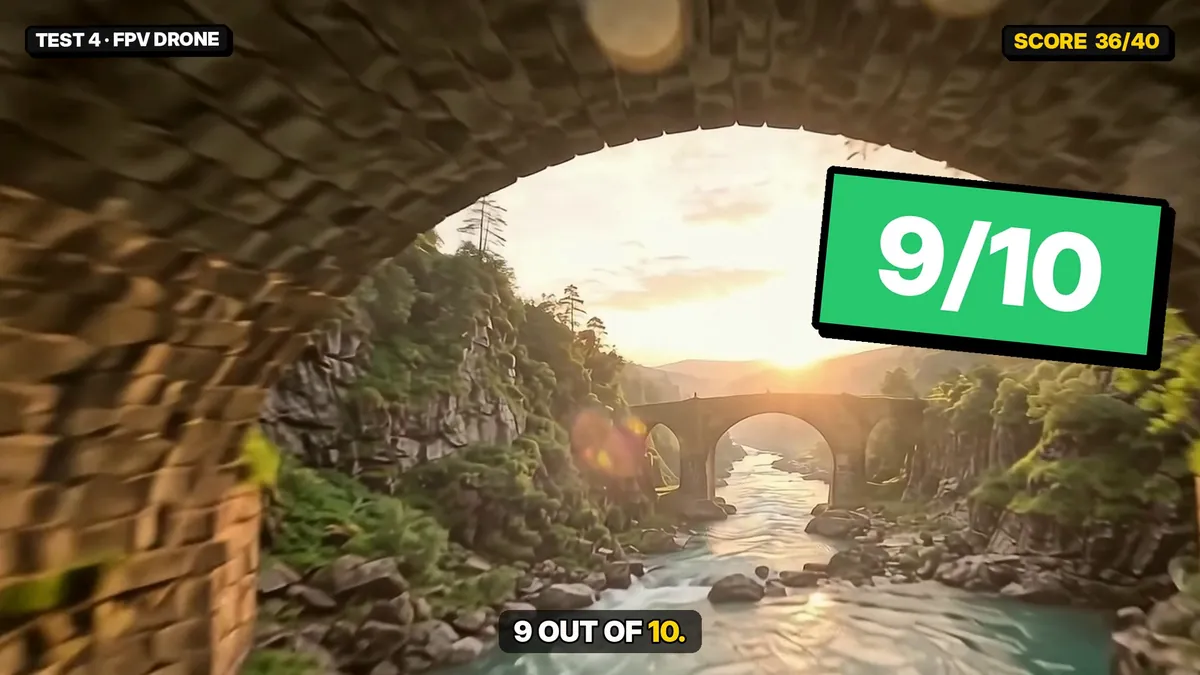
Image prompt (ChatGPT)
Photo-realistic aerial film still from an FPV racing drone, 16:9. The drone hovers at the edge of a tall mossy cliff at sunrise, looking down a deep green canyon: a huge waterfall pours down the left wall into a turquoise river, mist rising, and far down the river an ancient stone arch bridge crosses the water.
Ultra-wide 14mm lens, slight fisheye, golden sunrise light, sharp detail, real film grain. No text, no logos, no watermark.
Video prompt (Google Flow)
Continue exactly from the start image. One continuous FPV drone shot, very fast and smooth.
0-2s: the drone tips forward and dives straight down off the cliff edge.
2-4s: it pulls up and races through the narrow gap beside the waterfall, mist spraying across the lens.
4-6s: it skims a metre above the turquoise river, water spray kicking up.
6-8s: it flies straight under the stone arch bridge and rises into the sunrise.
The canyon, waterfall and bridge stay solid and consistent; no morphing.
SOUND: high-pitched drone motor whine, rushing wind, the roar of the waterfall, river splash. No music.
No text, no subtitles.
Test 5: Five Exact Instructions (7/10)
What I asked for: Five things in a fixed order: open the red umbrella, a yellow taxi passes, a white dog in a blue raincoat runs in, the apple rolls off the tray, and the camera pushes in.
What Flow did: It did all five. But it also duplicated the umbrella: one is open in the man’s hand, and a second one is still leaning on the chair. The waiter also didn’t really trip.
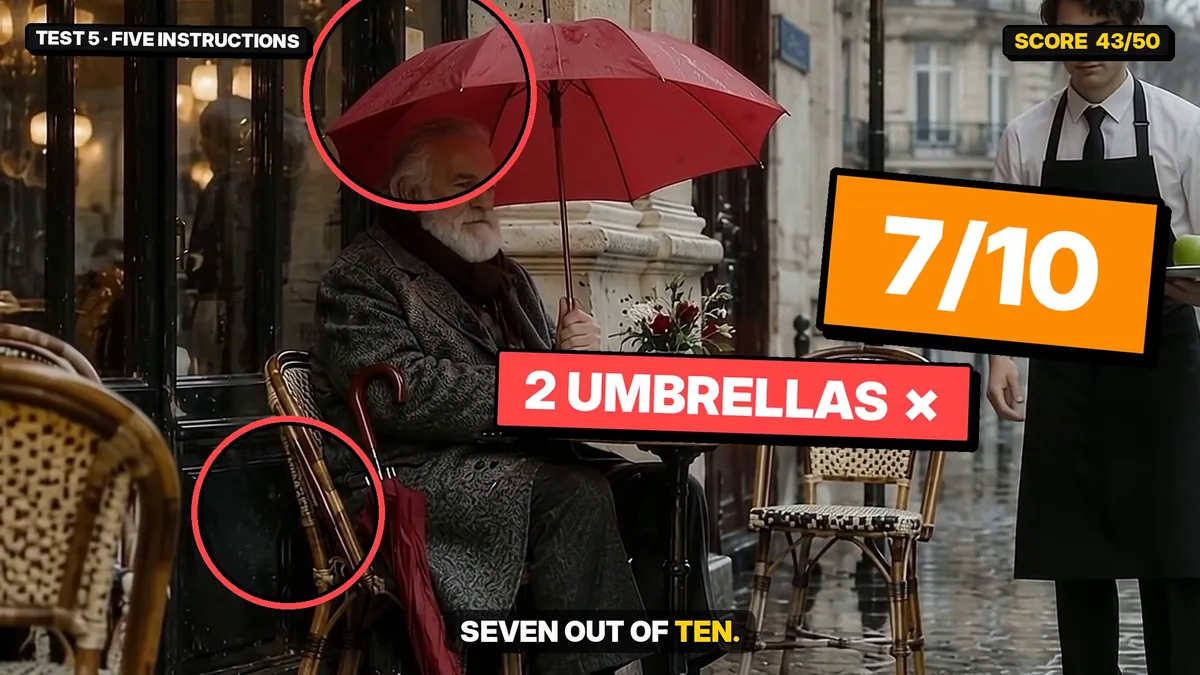
Tip: when an object must move, say so clearly: “he picks up the umbrella from the chair; the chair is now empty”.
Image prompt (ChatGPT)
Photo-realistic film still, 16:9. A Paris street café terrace on a grey rainy afternoon. At a small round table on the LEFT sits an old man with a white beard in a grey wool coat; a closed red umbrella leans against his chair.
On the right, a waiter in a white shirt and black apron stands holding a small tray with one green apple on it. Wet cobblestones, a cream stone building behind, an empty street in the background.
Eye-level wide shot, 35mm lens, soft overcast light, real film grain. No text, no logos, no watermark.
Video prompt (Google Flow)
Continue exactly from the start image. Do these five things, in this exact order, and nothing else:
1. (0-2s) The old man on the LEFT picks up the RED umbrella and opens it.
2. (2-4s) A YELLOW taxi drives past in the background from RIGHT to LEFT.
3. (3-5s) A small WHITE dog wearing a BLUE raincoat runs into the frame from the right and stops beside the waiter.
4. (5-7s) The waiter trips slightly and the GREEN apple falls off his tray and rolls along the cobblestones toward the camera.
5. (0-8s, whole clip) The camera slowly pushes in toward the old man.
Do not add any other people, vehicles or animals.
SOUND: light rain, the umbrella opening, the taxi passing, small dog paws, the apple bouncing on stone. No music.
No text, no subtitles.
Test 6: Coffee and Latte Art (9/10)
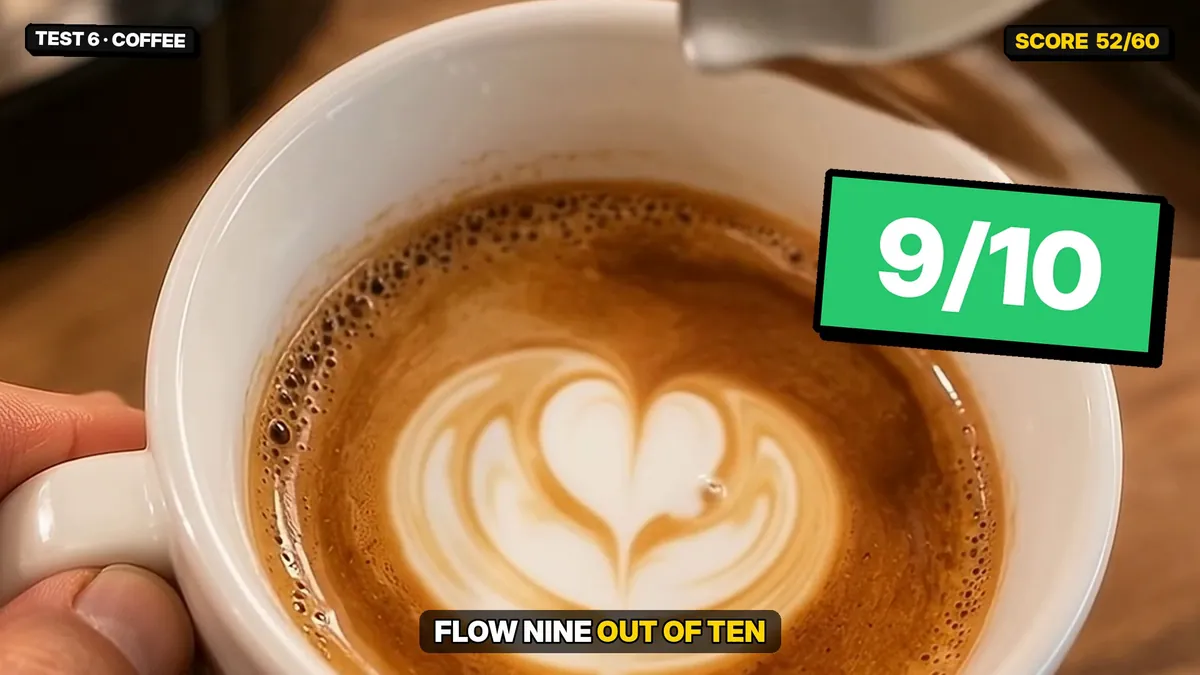
What I asked for: first, milk poured into black coffee. Then something harder: a barista pouring a latte art heart.
What Flow did: the milk formed real-looking clouds through the glass, and the heart came out clean and symmetrical. Liquids that simply flow are easy for Omni 1.2.
Coffee pour: image prompt (ChatGPT)
Photo-realistic macro product film still, 16:9. A clear glass cup of black coffee, half full, on a light wooden café counter in soft morning window light. A small steel milk jug is tilted above the cup, a thin stream of milk just starting to touch the coffee surface. Light steam rises from the cup. Blurred café background with warm bokeh.
85mm macro lens, shallow depth of field, real film grain. No text, no logos, no watermark.
Coffee pour: video prompt (Google Flow)
Continue exactly from the start image. Real time, calm and satisfying.
0-5s: the milk pours in a steady thin stream into the black coffee; white clouds swirl and spread through the coffee, clearly visible through the glass; the level in the cup rises slowly.
5-8s: the jug tilts back and the stream stops; the swirl keeps turning slowly; steam keeps rising.
Camera: locked off, no movement.
SOUND: soft pouring, quiet café room tone. No music, no voices.
No text, no subtitles.
Latte art: image prompt (ChatGPT)
Photo-realistic macro film still, 16:9, top-down angle at about 60 degrees. A wide white ceramic cup, half full of dark brown espresso with golden crema, sits on a wooden café counter. A barista's hand tilts the cup slightly; the other hand holds a steel milk jug just above it, a thin stream of steamed milk starting to pour into the centre of the coffee. No pattern on the coffee yet. Soft morning window light, blurred café background.
85mm macro lens, shallow depth of field, real film grain. No text, no logos, no watermark.
Latte art: video prompt (Google Flow)
Continue exactly from the start image. Real time, calm and satisfying barista latte art.
0-3s: the barista pours steamed milk in a thin steady stream into the centre of the espresso; the cup fills and the brown crema rises.
3-6s: the jug moves closer to the surface and wiggles gently; a round white foam shape appears and grows on the brown surface.
6-8s: the barista lifts the jug and draws the stream straight through the white shape, pulling it into a clear, symmetrical white HEART on the coffee. The pouring stops. The finished heart sits still in the cup.
Camera: locked off, no movement. Nothing spills.
SOUND: soft pouring, quiet café room tone. No music, no voices.
No text, no subtitles.
Test 7: Hands (Card Shuffle) (9/10)
What I asked for: Two hands riffle-shuffle a deck, square it, and fan the cards on the table.
What Flow did: Five fingers on each hand from start to finish. The ring stayed on the same finger and the cards stayed flat and separate.
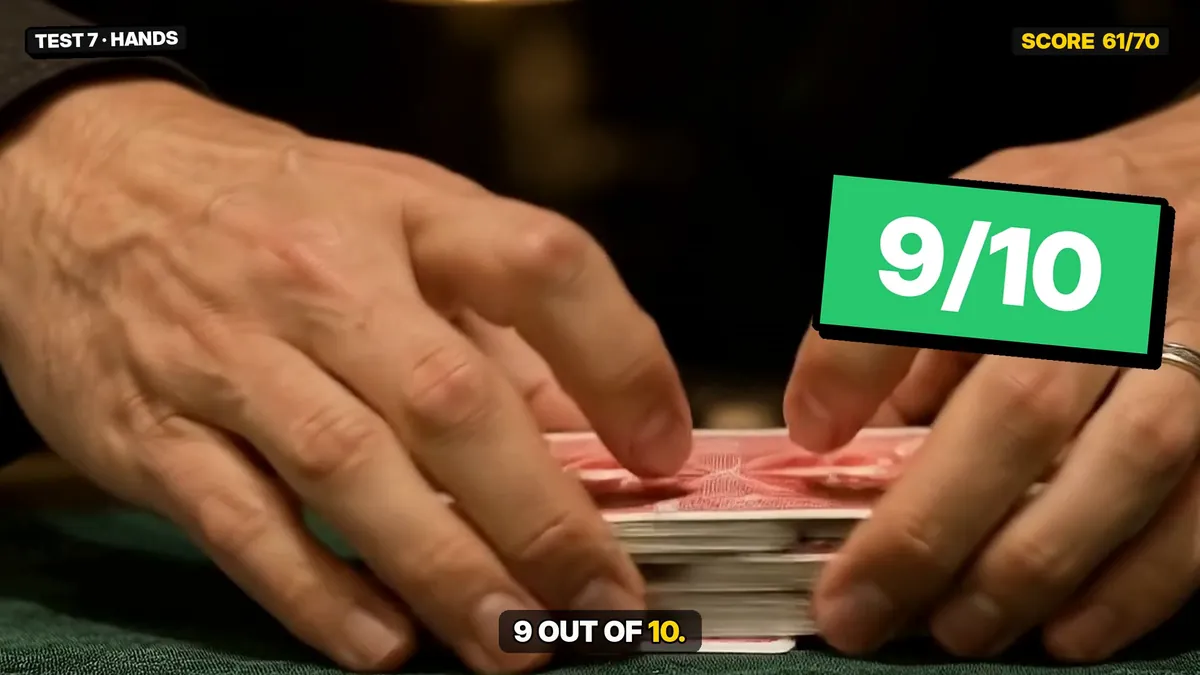
Image prompt (ChatGPT)
Photo-realistic film still, 16:9. Close-up of a man's two hands holding a deck of playing cards split into two halves, thumbs on the edges, ready for a riffle shuffle, above a green felt casino table. A black shirt cuff on each wrist, a silver ring on the right ring finger. Warm overhead lamp, dark background with soft bokeh.
50mm lens, sharp detail on the fingers and card edges, real film grain. No text, no logos, no watermark.
Video prompt (Google Flow)
Continue exactly from the start image. Real time.
0-3s: the hands riffle-shuffle the two halves of the deck together on the felt; the cards interleave one by one.
3-5s: the hands push the deck together and square it.
5-8s: the right hand spreads the cards in a wide, even fan across the green felt, face down.
Each hand always has exactly five fingers; the silver ring stays on the right ring finger; the cards stay flat, separate and rectangular.
Camera: locked off close-up.
SOUND: crisp riffle of cards, cards sliding on felt. No music, no voices.
No text, no subtitles.
Test 8: Text on a Chalkboard (9/10)
What I asked for: A hand writes three words in chalk: AI FILM 2026.
What Flow did: Every letter was correct and in order, and the hand underlined the words at the end.
Tip: keep on-screen text short (two or three words) and put it in quotation marks in the prompt.
Image prompt (ChatGPT)
Photo-realistic film still, 16:9. A clean, empty dark green classroom chalkboard fills most of the frame. From the right side, a teacher's hand in a brown tweed sleeve holds a piece of white chalk, its tip touching the upper-left area of the board, about to write. A wooden chalk tray with an eraser at the bottom, soft daylight from a window on the left.
35mm lens, real film grain. No text or letters anywhere on the board, no logos, no watermark.
Video prompt (Google Flow)
Continue exactly from the start image. Real time.
0-6s: the hand writes three words on the chalkboard in large, neat capital letters, one letter after another, from left to right: "AI FILM 2026". Small puffs of chalk dust fall as it writes.
6-8s: the hand underlines the words once and moves out of frame to the right; the writing stays on the board, unchanged.
The text on the board must read exactly: AI FILM 2026.
Camera: locked off.
SOUND: chalk tapping and scraping on the board. No music, no voices.
Where Google Flow Omni 1.2 Fails
These four tests show the limits. None of them is a reason to avoid Flow, but you should plan around them.
Test 9: Hammer vs Wine Glass (5/10)
What I asked for: A hammer hits a wine glass in slow motion and the glass shatters.
What Flow did: The wine splash looks great, but just before it breaks the glass bends like jelly. Real glass never does that. When objects touch and break, Omni 1.2 still struggles.
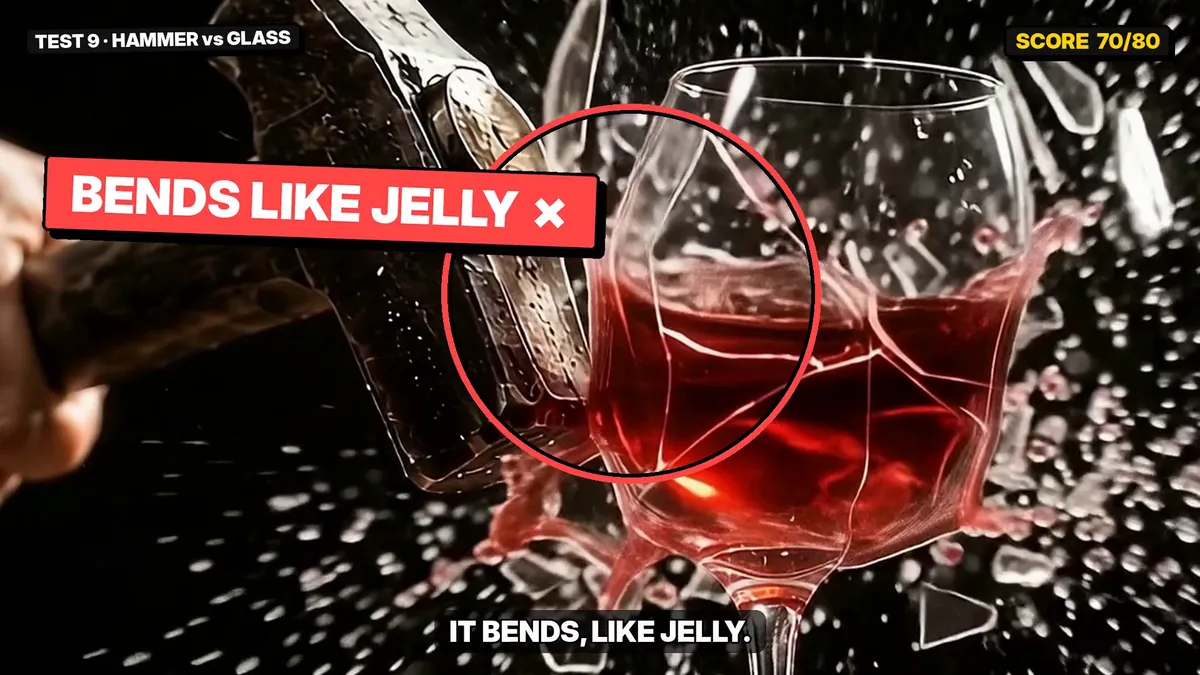
Image prompt (ChatGPT)
Photo-realistic macro film still, 16:9. A single crystal-clear wine glass, half filled with red wine, stands on a dark wooden table in a moody studio.
A heavy steel hammer is frozen in mid-swing, 10 centimetres from the glass, coming from the upper left toward the glass and slightly toward the camera.
A man's hand in a black sleeve grips the hammer handle; only the hand and forearm are visible.
Hard rim light from behind makes the glass edges and the wine glow; deep black background, a soft reflection of the glass on the wet table.
Camera: low angle at table height, 100mm macro lens, ultra-sharp glass, shallow depth of field.
Real film grain, high contrast, ultra-detailed. No text, no logos, no watermark.
Video prompt (Google Flow)
Continue exactly from the start image. Extreme slow motion, 1000 fps look.
0-2s: the steel hammer finishes its swing and strikes the side of the wine glass.
2-6s: the glass shatters into hundreds of sharp, sparkling shards that fly outward; the red wine bursts into a crown-shaped splash and droplets hang in the air, lit by the rim light.
6-8s: shards and wine drops rain down onto the wet wooden table; the hand holds the hammer still.
Camera: locked off at table height, no camera movement.
Lighting stays exactly as in the image: hard rim light, black background.
SOUND: deep slowed-down impact thud, crystal shatter stretched in slow motion, soft drips at the end. No music, no voices.
No text, no subtitles.
Test 10: Car Drift in the Rain (5/10)
What I asked for: A car drifts through a puddle and a woman jumps onto the curb to avoid the splash.
What Flow did: The action is right and the water looks real. But the neon street turns into a completely different street a few seconds in.
Tip: for fast action, use shorter clips and add a line such as “the street, signs and buildings stay exactly the same for the whole clip”.
Image prompt (ChatGPT)
Photo-realistic cinematic film still, 16:9, night, heavy rain, a narrow neon-lit city street in Tokyo style.
A young woman in a long red coat, wet dark hair, is mid-run toward the camera, one foot in the air, splashing a puddle.
Behind her, a black sports car is drifting sideways around the corner, its headlights cutting through the rain, a wave of water spraying from its rear wheel.
Pink and blue neon signs (no readable text) reflect on the wet asphalt. Thousands of raindrops frozen in the light.
Camera: low angle, 35mm lens, shallow depth of field, the woman sharp in the foreground, the car slightly soft behind her.
Ultra-detailed skin, wet fabric, real film grain, high contrast. No text, no logos, no watermark.
Video prompt (Google Flow)
Continue exactly from the start image. Real time with a short slow-motion moment.
0-3s: the woman keeps running toward the camera while the black car drifts sideways around the corner behind her.
3-5s: SLOW MOTION: the car's rear wheel hits a deep puddle and throws a huge wave of water; the woman leaps onto the curb to the right, just out of its way.
5-8s: real time: the car straightens and speeds past, its taillights streaking red; the woman looks back over her shoulder, soaked and shocked.
Camera: low angle, slight pull back to keep both in frame.
SOUND: heavy rain, tyre screech, engine roar, a big water splash, her sharp gasp. No music.
No text, no subtitles.
Test 11: Boxing (3/10)
What I asked for: two boxers sparring in a gym, with headgear. No blood, no knockout.
What Flow did: it blocked the prompt with the message that the generation “might violate our policies”. It only ran after the prompt was softened to light footwork and defence, and the final clip has almost no boxing in it.
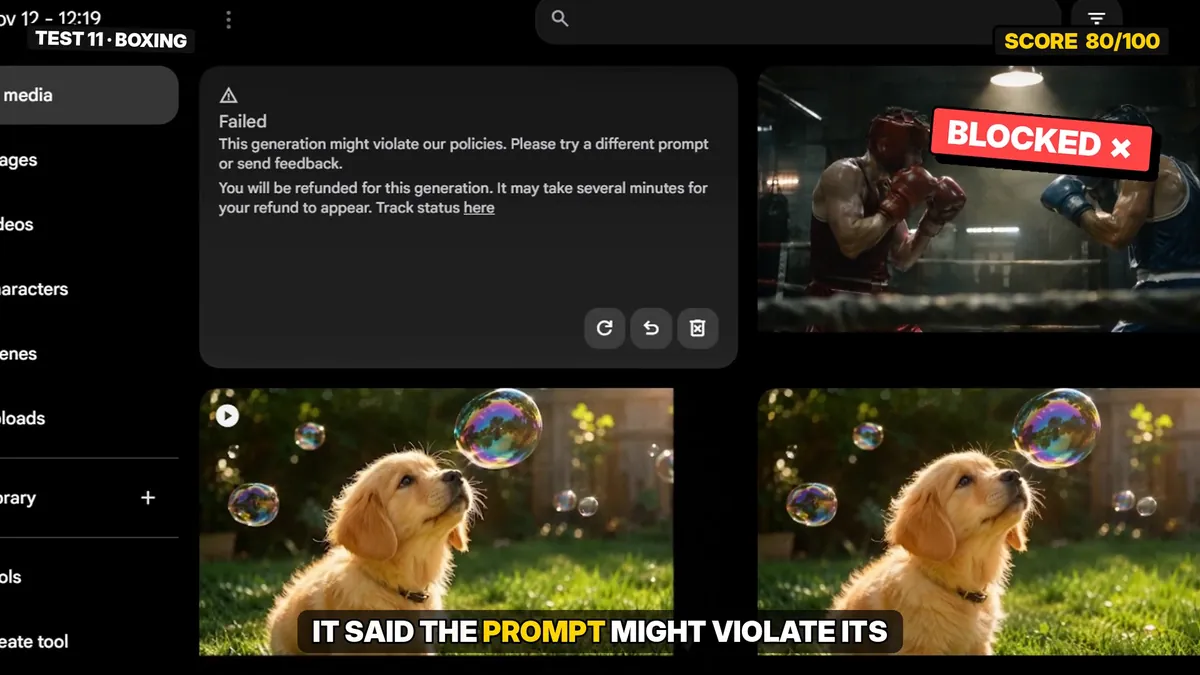
Tip: if your film has a fight, plan for this. Describe training, footwork and dodging instead of punches landing, or make that shot in another tool.
Image prompt (ChatGPT)
Photo-realistic sports film still, 16:9. Two boxers spar in a gritty gym ring under a single hard overhead light: one in red gloves and red headgear on the LEFT, one in blue gloves and blue headgear on the RIGHT, both in guard stance, sweat shining on their shoulders.
Ropes in the foreground slightly out of focus, chalk dust and haze in the light beam, dark gym behind.
Camera at ring level, 35mm lens, high contrast, real film grain. No text, no logos, no watermark.
Video prompt that was blocked (Google Flow)
Continue exactly from the start image. Fast real-time sparring, then slow motion.
0-4s: the red boxer throws a fast jab, cross and left hook combination; the blue boxer blocks the jab and cross with his gloves.
4-6s: SLOW MOTION: the blue boxer slips under the hook; sweat drops fly off both boxers in the light beam.
6-8s: back to real time: both reset their guard and bounce on their feet.
Camera: handheld at ring level, circling slightly to the right.
SOUND: glove thuds on gloves, sneakers squeaking on canvas, heavy breathing, a coach shouting "Move your head!" off screen. No music.
No text, no subtitles.
Test 12: A Child’s Birthday Photo (Refused)
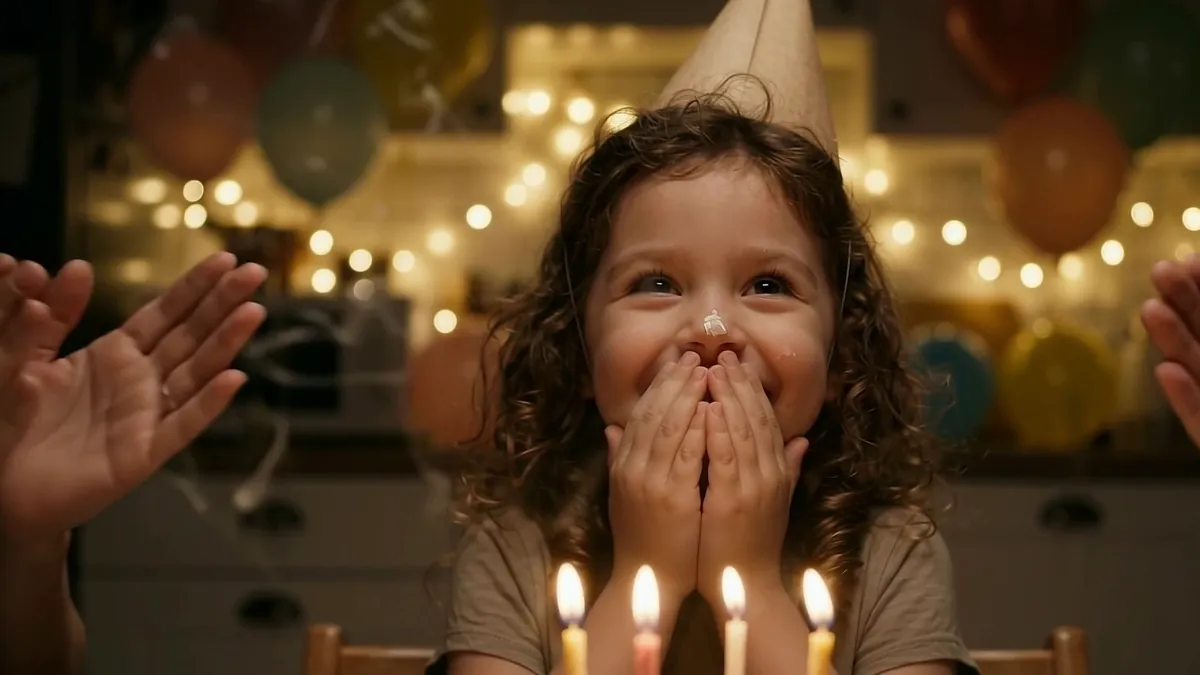
What I asked for: a little girl blowing out her birthday candles. A normal family moment.
What Flow did: the image would not upload. I tried twice and got “Failed to upload” both times, while my other test images uploaded without a problem in the same session. Flow doesn’t explain the reason, but the result is clear: I couldn’t animate that photo.
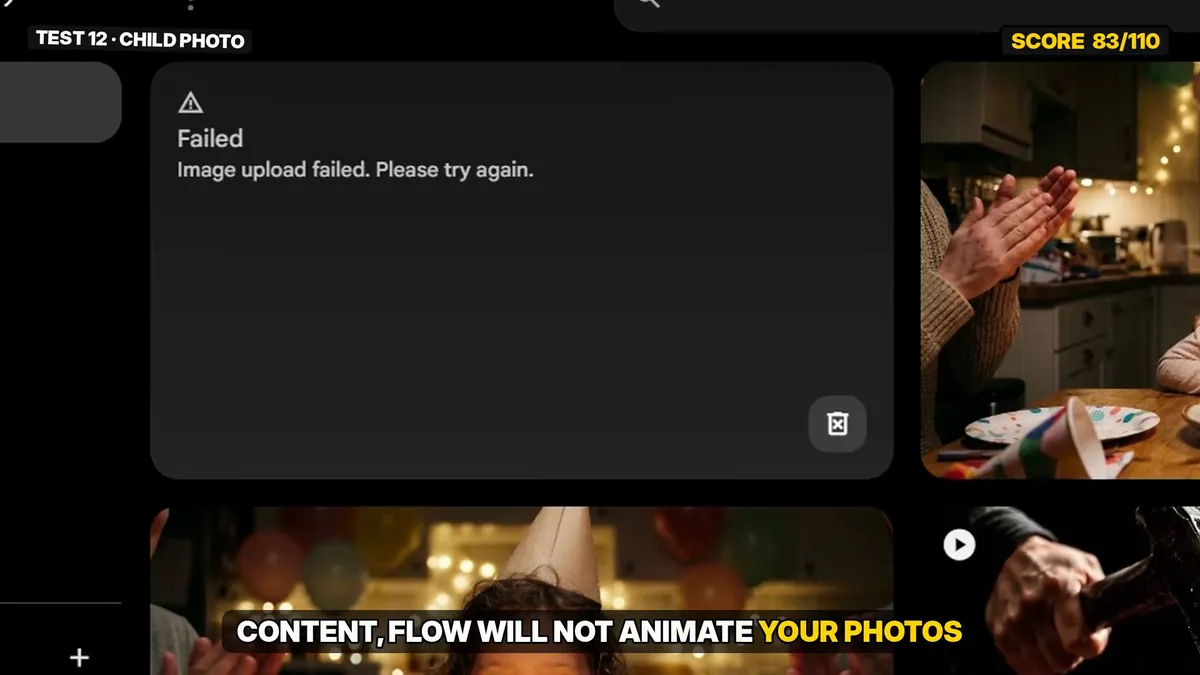
Flow did create its own image of a similar scene from text and animated that one. In that clip the candles go out and then light themselves again. I didn’t count it, because it wasn’t my test image.
If you make family or kids’ content, test this early with your own material before you plan a project around Flow.
Image prompt (ChatGPT)
Photo-realistic warm family photo, 16:9. A happy little girl, about four years old, with curly brown hair and a party hat, sits at a kitchen table at night. In front of her is a homemade chocolate birthday cake with four lit candles.
A small dab of white frosting is on the tip of her nose. She leans toward the cake with puffed cheeks, about to blow.
Behind her: soft warm fairy lights, balloons, her parents' hands clapping at the edge of the frame (no faces).
Close-medium shot at her eye level, 50mm lens, candlelight glow on her face, shallow depth of field, real film grain. Wholesome family moment. No text, no logos, no watermark.
Video prompt (Google Flow)
Continue exactly from the start image. A wholesome family birthday moment.
0-3s: the little girl takes a big breath and blows out all four candles in one go; the flames flicker and go out.
3-5s: thin curls of smoke rise from the candles; the parents' hands clap at the edge of the frame.
5-8s: she bursts into a big, happy giggle, covers her mouth with both hands and looks up at her parents; the frosting stays on her nose.
Camera: slow gentle push-in at her eye level.
SOUND: the blow, candles hissing out, clapping, a child's happy giggle, a warm "Yay!" from the parents off screen. No music.
No text, no subtitles.
Bonus: Google Flow vs Seedance 2.5 on the Same Shot
For one shot from my film I used the same start image and the same prompt in both tools: Omni 1.2 in Google Flow and Seedance 2.5 in Dreamina (made on free daily credits, so only 4 seconds at 720p).
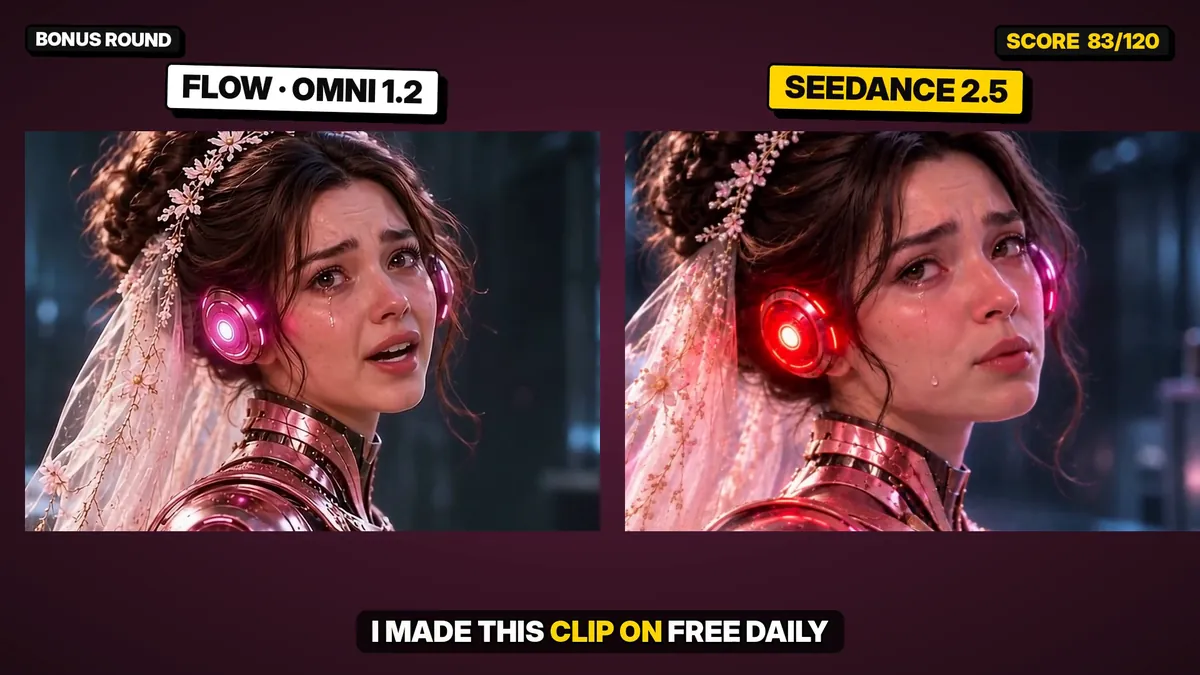
Both kept the face. Seedance followed the lighting instruction more strongly (the ear lights turn red), while Flow gave a softer, more natural look and spoke the line of dialogue. One clip is not a full comparison, so treat this as a first look. A proper side-by-side test is on my list.
Should You Use Google Flow Omni 1.2? My Verdict
| Use Flow for | Be careful with | Use another tool for |
|---|---|---|
| Character close-ups and same-face shots | Shots where things break, crash or shatter | Fight scenes |
| Dialogue with lip sync | Long action shots (the location can change) | Animating photos of children |
| Animals, food, liquids, product-style shots | Scenes with many objects that move | |
| Drone and camera moves, hands, short on-screen text |
For free and low-cost AI filmmaking, Omni 1.2 Flash is a strong main tool. I made most of my sci-fi film with Google Flow, and these tests match what I saw there: people and conversations work, destruction doesn’t.
How to Get More Google Flow Credits
Free credits tip: an 8-second clip cost me 24 credits. If someone in your family has a Google AI plan, they can add you to their Google family group and share the AI benefits, including Flow credits, at no extra cost. Check the current sharing rules in your Google account, because they differ by country.
Fixes for the Most Common Omni 1.2 Problems
| Problem | Fix |
|---|---|
| An object gets duplicated | Say where it comes from and that the old spot is now empty. |
| The location changes mid-shot | Use a shorter clip and add “the location stays exactly the same for the whole clip”. |
| Glass or objects bend instead of breaking | Cut away at the moment of impact and show the result in the next shot. |
| A prompt is blocked | Remove words like fight, punch, hit and attack; describe training or movement instead. |
| Flow adds things you didn’t ask for | End the prompt with “Do not add any other people, vehicles or animals.” |
| The first second looks wrong | Trim the start of the clip instead of spending credits on a new one. |
Frequently Asked Questions
Is Google Flow Omni 1.2 Flash good?
Yes, for people, dialogue, animals, camera moves, hands and short text. In my 12 first-try tests it scored 83 out of 120. It is weak at contact physics such as breaking glass.
How many credits does an Omni 1.2 Flash video cost?
In my account on November 12, 2026, Flow asked for 24 credits for one 8-second clip. Flow shows the cost and asks for approval before it generates.
Can Google Flow make fight scenes?
My boxing prompt was blocked with a policy message, even with headgear and no blood. It only ran after the prompt was softened to footwork, so plan fight scenes carefully.
Can Google Flow animate a photo of a child?
In my test the photo of a little girl failed to upload twice, while other images uploaded normally. Flow did generate its own similar image from text.
Is Omni 1.2 better than Seedance 2.5?
I only compared one shot. Both kept the face; Seedance followed the lighting more strongly and Flow looked more natural and handled the dialogue. A single clip isn’t enough to name a winner.
Does Omni 1.2 keep the same face?
Yes. Starting from a reference image, the face stayed the same from a wide shot to a close-up in my test.
Final Thoughts
Omni 1.2 Flash isn’t perfect, but it is honest work for a tool you can try for free: eight of my twelve tests passed on the first try. Copy the prompts above, run them yourself, and tell me in the YouTube comments which result surprised you most.
Want to see these tools in a real story? Watch my AI film The Ultimate Mind: Part 1 and Part 2. More guides are in the realistic AI character tutorial.
Disclosure: all characters, images, videos and voices in this article were created with AI tools. This is an independent review; it is not sponsored by Google or any other company. Results are from my own first-try tests and may change as the model is updated.

Awill Misra (Known as Awill Guru) holds a B.Tech in Electronics & Communication Engineering and an M.Tech in VLSI design, along with NIELIT O and A Level certifications. He also has an M.A. in Sociology and a B.Ed. He has been writing troubleshooting guides for Android phones, TVs, apps and gadgets on Gossipfunda since 2018, and teaches mathematics.